Connect Registry
You need to have a Docker registry in order to store your application container. codefresh will push your application to the registry after it is built.
Then the Kubernetes cluster will pull this container in order to launch the application.
By using the public DockerHub registry, we don’t need to setup any credentials or authentication information. In a real production application you might use a private container registry such as Amazon ECR.
Create an Dockerhub account
Sign up for a free Dockerhub account at https://hub.docker.com/signup.
Note down your username and password as we will use them later in Codefresh.
Connect the container registry to Codefresh
Log into Codefresh and go to your Registry settings at https://g.codefresh.io/account-admin/account-conf/integration/registryNew.
Click the Add Registry provider button and select Dockerhub from the drop down menu.
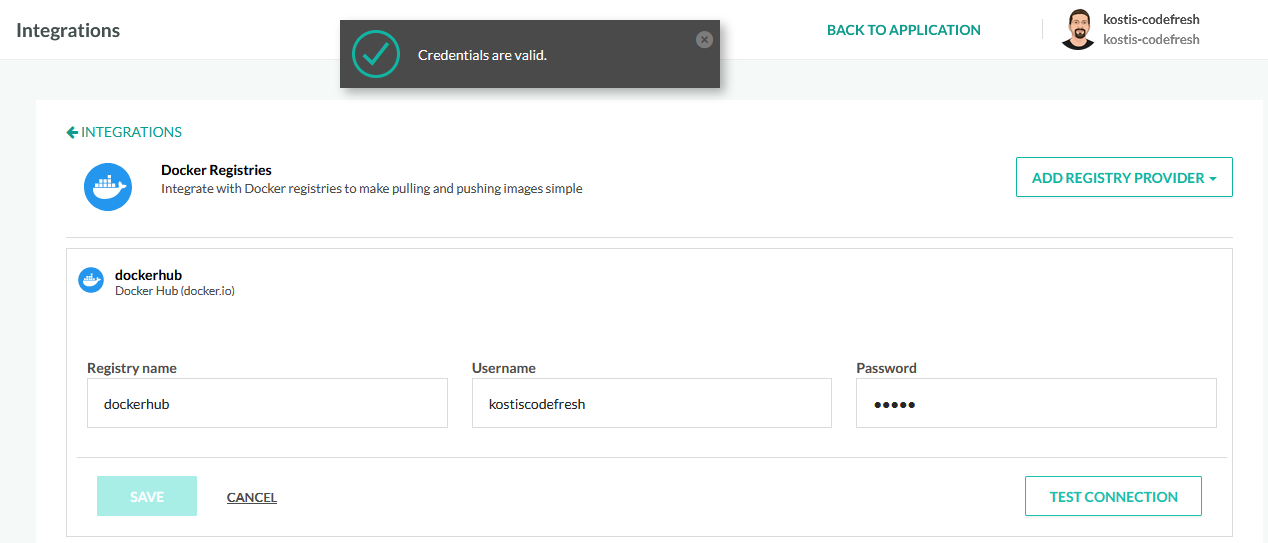
Fill the 3 fields
- Registry name -
dockerhub - Username - Your DockerHub ID that you used to signup
- Password - Your DockerHub password that you used to signup
Click the Test connection button on the lower right to verify your settings. You should get a success message at the top of the screen.
Finally click the Save button to apply your changes.
The registry name we used (dockerhub in our case) is important because
we will reference it in the following sections inside our pipelines. If you
choose another name for your integration, remember to note it down.